

Morie IDE · macOS · beta
Making work less grumpy.
Claude Code and Codex, organised. Less hovering.
Morie IDE is a Mac app for your agents: tickets, chats and memory in one window, and your phone when you step away.
Beta · always free on your Mac, no account needed · Apple silicon


Run many at once
Agents in parallel.
Claude Code and Codex side by side, each ticket on its own branch and worktree. More agents; Morie keeps the wires straight.
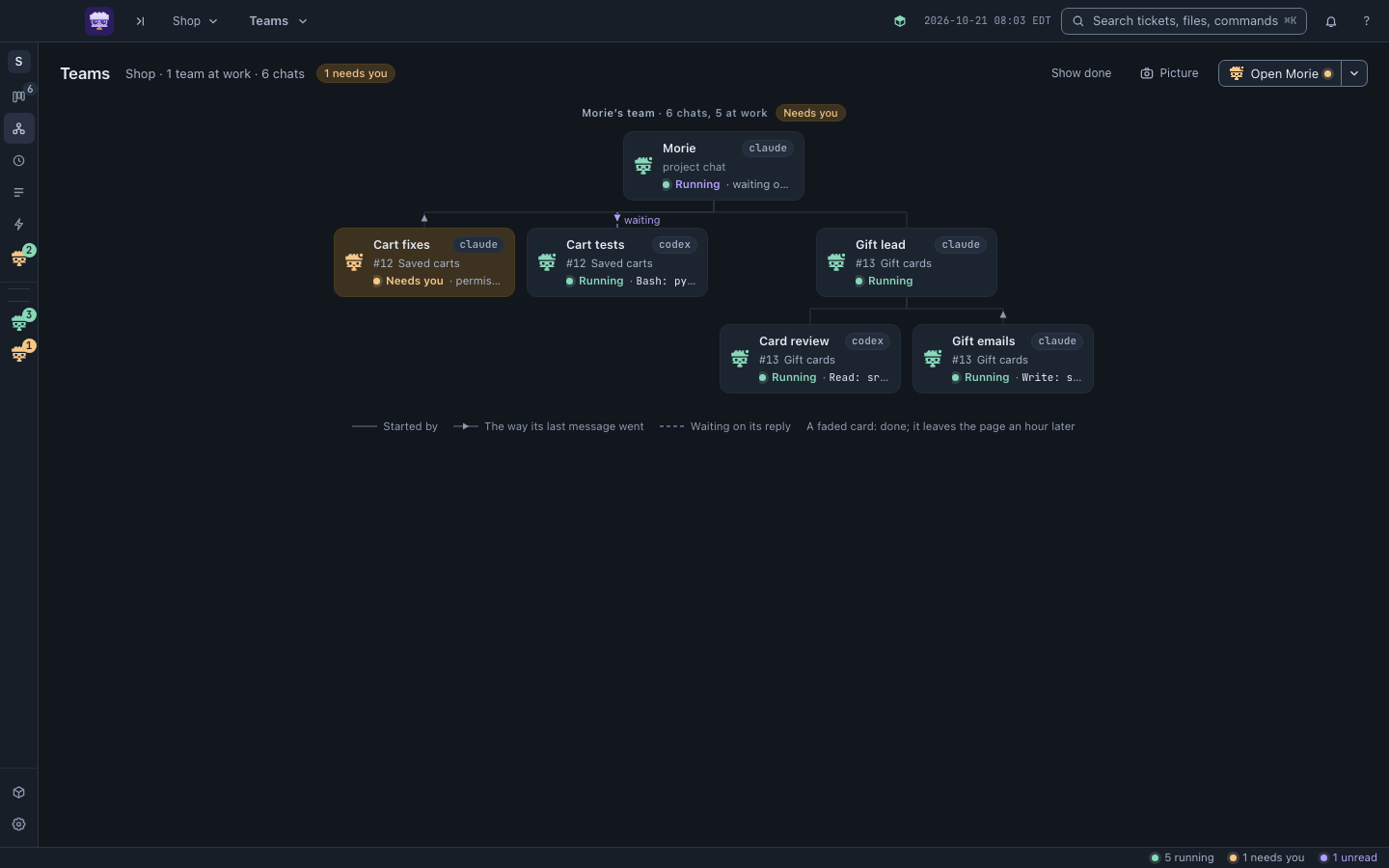
Side by side
Claude Code and Codex, with your sign-ins and your choice of model for each chat.
A branch and worktree per ticket
Separate tickets keep separate work apart, without asking you to juggle folders.
Chats that run chats
Chats start, message and wait on each other, within their reach and running limits. The team shows who reports to whom.
Connected devices · Morie Remote
Away from the Mac. Still in charge.
Answer, steer and start your chats from your phone or another device.
Pair once by matching a six-digit code on both screens. Your chats travel sealed end to end, and the work stays on your Mac.
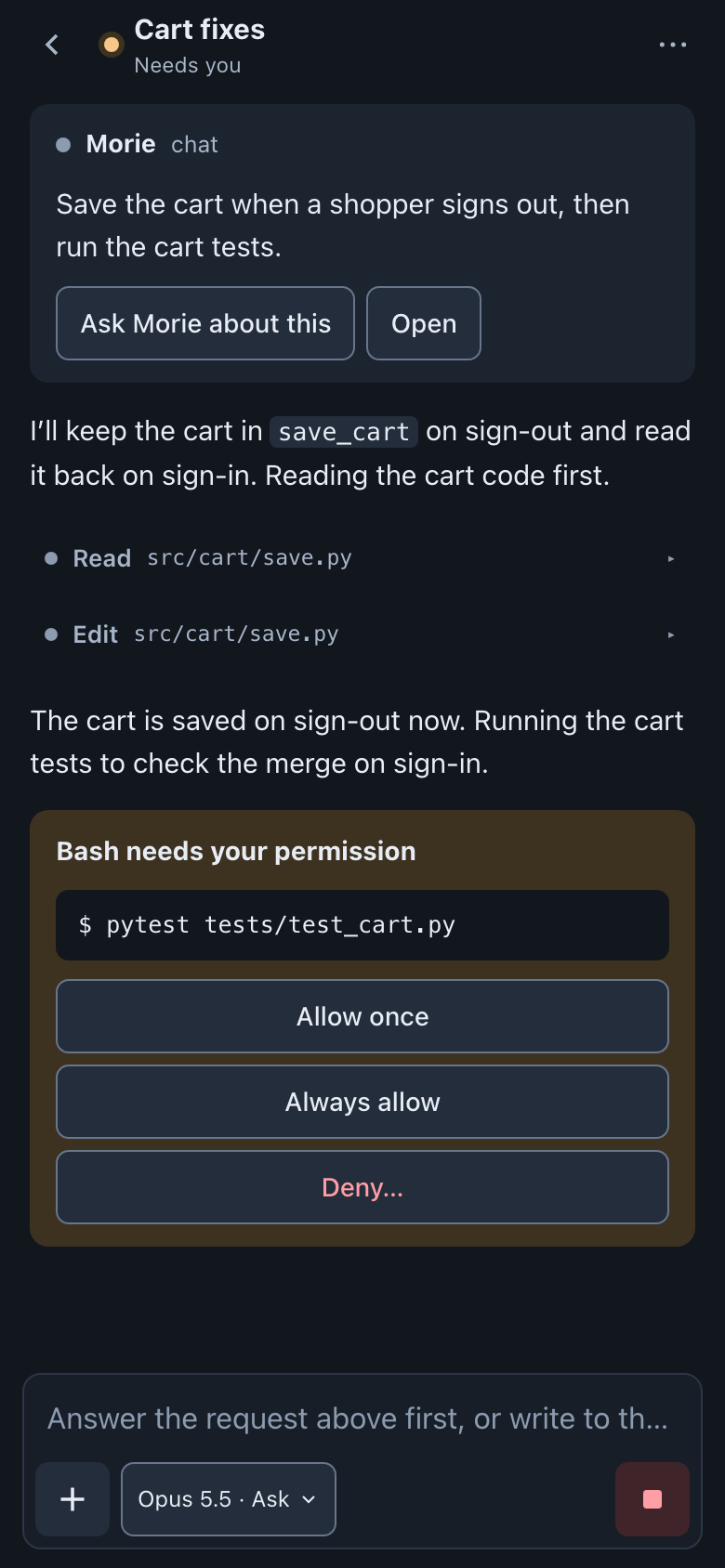
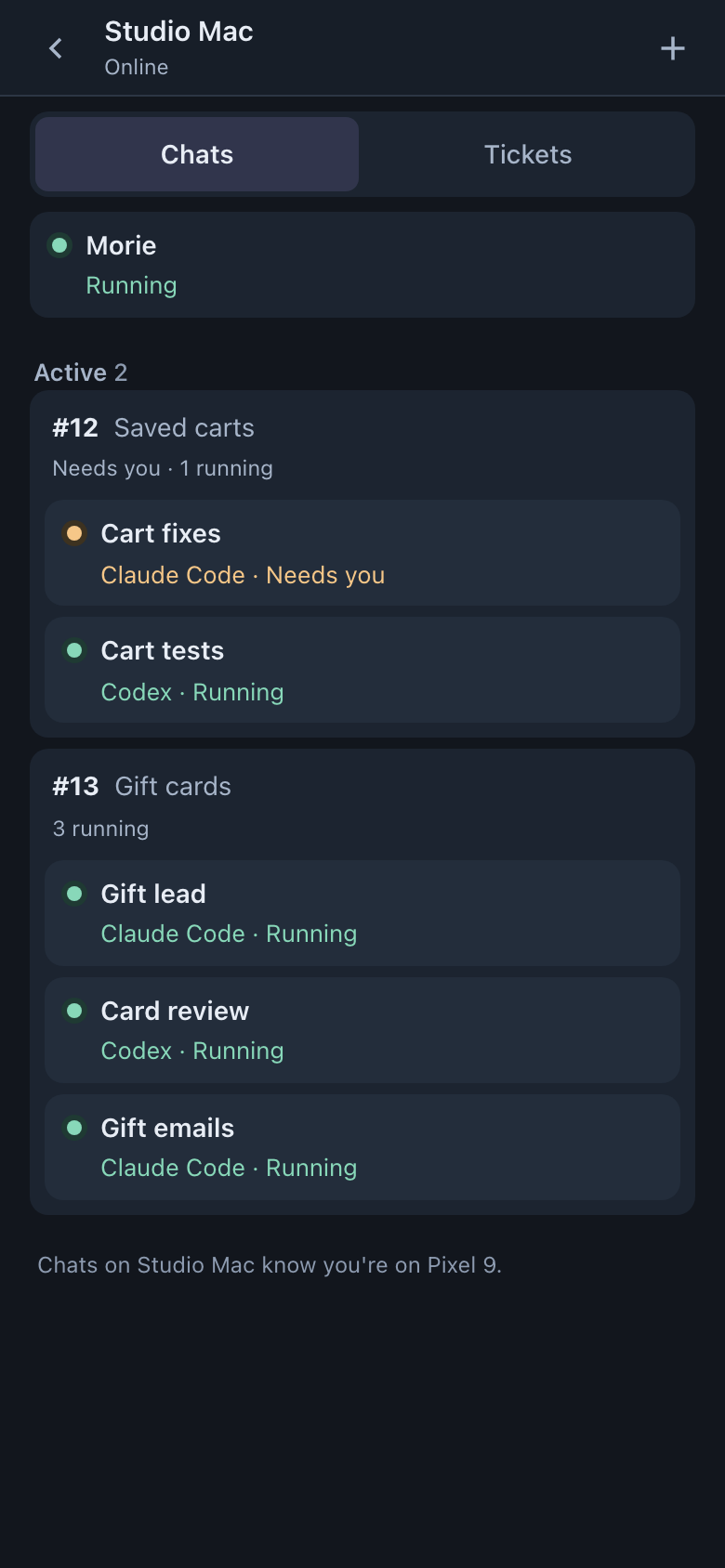
Answer
Questions and permission cards: Allow once, Always allow or Deny…
Steer
Send, Queue, Steer or Stop. Type / for the agent’s commands.
Start
New chat on a ticket or in Base, with its agent, model and permissions. Open the Mac’s tickets too.
Morie Remote is by invitation for now.
Memory · automations · checks · reviews
Morie does the chores.
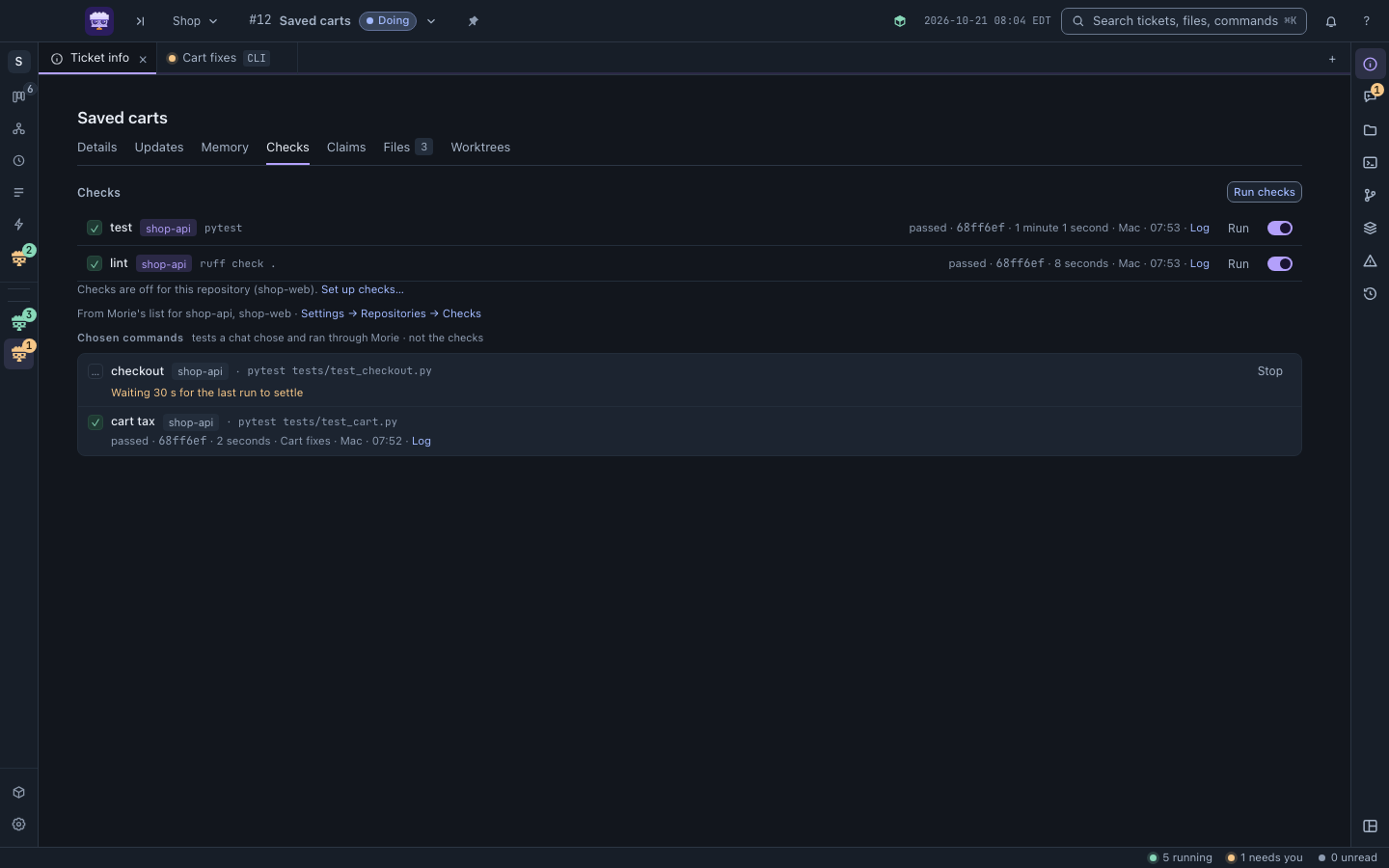
Explain it once and Morie remembers. Repeat work runs itself, and tests wait their turn on a busy Mac.
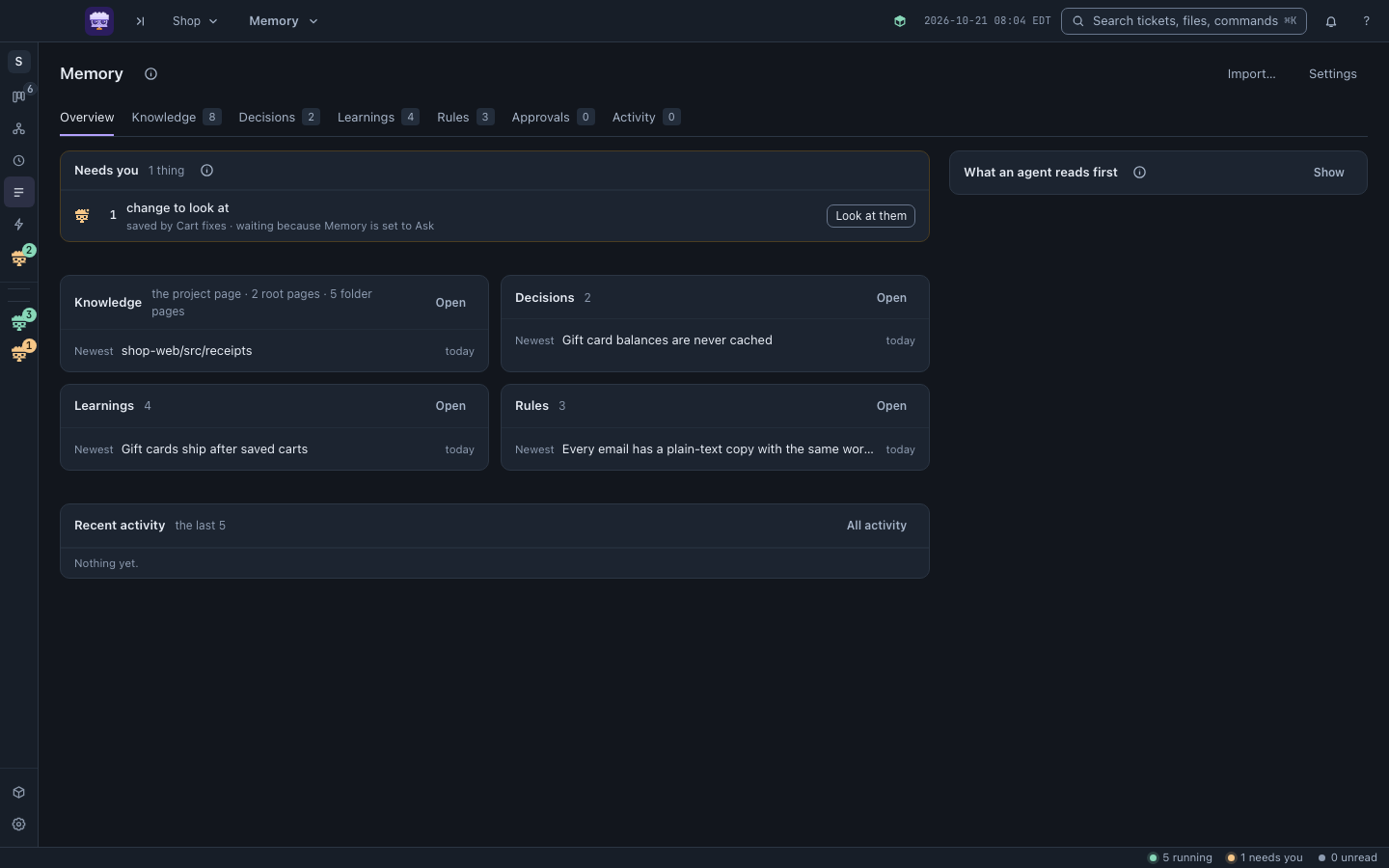
Memory
Knowledge, decisions, learnings and rules stay with the ticket until merge, then reach the project’s chats.
Automations
Write repeat work as When, If, Then, and inspect the runs when something needs you.
Checks
Named checks run whole on a ticket’s commit. Chats run any test command through Morie with mcheck, in any language.
Reviews
Review changes in Git, mark files Viewed and send line comments back. A chat can start a reviewer to check its work.
Secrets · Morie Box · your agents
Safe by default.
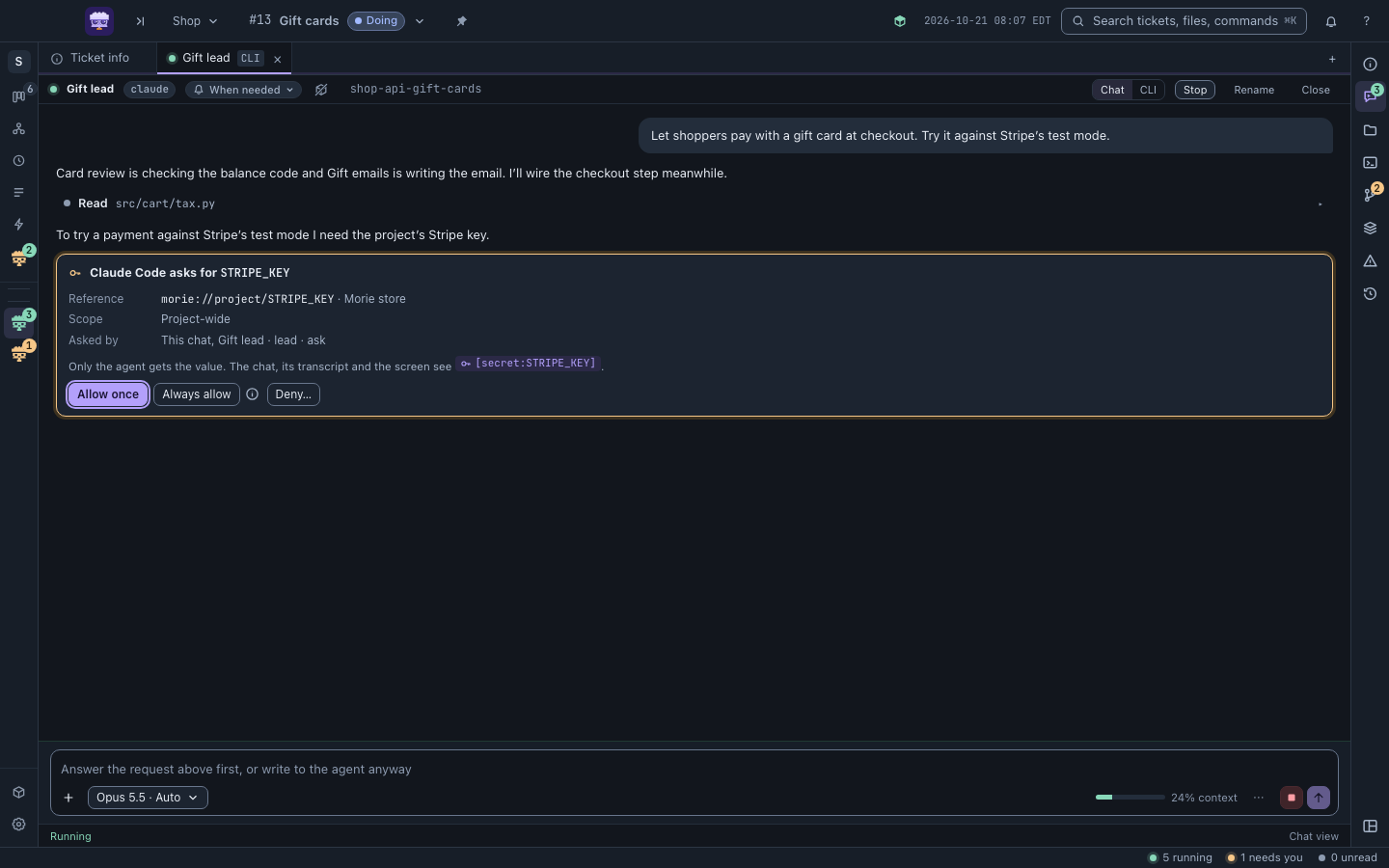
Agents use secrets without seeing them, work in a sandbox when you want one, and stay yours.
Secrets
A rule per key: Always, Ask or Off. Chats, transcripts and logs show [secret:NAME], never the value.
The Morie Box
A sandbox on your Mac. Chats, terminals and each ticket’s rig can run inside it, kept apart from the rest of your Mac.
Your agents. Still yours.
Your sign-ins. Plan to look, Ask to check with you, Auto to work within the agent’s limits.
Kept on your Mac.
The full list
Everything Morie does.
Every major piece, in one place: what’s always free on your Mac, and Morie Remote. Scroll if you must.
Morie IDE on your Mac
Everything runs and stays on your Mac. No account, no limits.
Tickets
Keep work, chats and history together, including the bits you thought you were finished with.
Board, list and saved views
Search, sort, filter by any field and save the view so you can stop arranging it.
A branch and worktree per ticket
Separate tickets keep separate work apart. Switch one to a teammate’s branch to review it.
Chats with Claude Code and Codex
Your sign-ins and your choice of model for each chat.
Another account at a limit
When an account runs out of usage, a chat can move to your next account with usage left and carry on. Always, Ask or Off.
Chat view or terminal, one session
Switch views without starting the conversation over.
Chats that run chats
Chats start, message and wait on other chats within their reach and running limits.
The Morie chat
The project’s lead. It starts chats, routes what happens, and reports back. The chats it starts fold under it.
Needs you and notifications
The sidebar, Dock and notifications point to the chat waiting for your answer. A chat’s message for you comes as a card, with Reply and Dismiss.
Close the window, keep working
Agents keep working while Morie stays in the Dock, with no window to hover over.
Memory
Knowledge, decisions, learnings and rules stay with the ticket until merge, then reach the project’s chats.
Rules, with your say
A Base chat can add, change or archive a rule. Each time, a card shows the whole rule, its scope and why, and waits for Allow once.
Checks and mcheck
Named checks run whole on a ticket’s commit. Chats run any test command through Morie with mcheck, kept on the ticket apart from the checks.
Keep free
Holds new chats, checks runs and rig builds while this Mac is busy, starts test runs one at a time, and suggests its own limits.
Pull requests
Open a pull request, fill its template, watch its checks and see conflicts.
The Git tab
Review changes, mark files Viewed and send line comments back to the chat.
Morie Box
A built-in sandbox on your Mac. Chats, terminals and rigs run inside it; memory, CPU, disk and internet are yours to set. A chat can set it up for a rig, asking first.
Rigs
A repository’s services, run for one ticket inside the Morie Box at their own addresses. Two tickets, two rigs, no port fights.
Secrets
Agents use secrets without seeing them: a rule per key, Always, Ask or Off, and a switch for the Morie Box.
Automations
Write repeat work as When, If, Then, and inspect the runs when something needs you.
Monday
Import work with mappings a chat proposes and you confirm.
Windows, layouts and the mini window
Split views, save layouts and make one the default for new tickets. Float a chat above the other things demanding your attention.
Files and the editor
Create, rename, edit and search files beside your chats. Finder is one click away.
The editor’s overview strip
A thin strip by the scrollbar shows problems, changes since the last commit, find matches and the cursor. Click a mark to go to it.
Drop files on a chat
Drop files anywhere on a chat, from Finder or the file tree. Each shows as a tag with its size; one that can’t be attached says why.
Annotate
Mark up a picture or page a chat sent you, and send the marked part back with your note.
Language servers and problems
Morie installs each repository’s language tools and shows what they found in one pane.
Terminals and run scripts
Start a ticket’s run scripts from its terminals picker and see what is still running.
Permissions in words
Plan looks, Ask checks with you, and Auto works within the agent’s limits.
⌘K and shortcuts
Find tickets, files and commands with ⌘K. Rebind any shortcut.
Settings in layers
Per Mac, per project, per repository. Change one without the others.
Backups and updates
Morie backs up before a new version changes your data, and asks when to restart.
Kept on your Mac
Tickets, chats and memory live on your Mac.
Morie Remote: your chats, when you’re away
Morie Remote is by invitation for now.
Your chats on your phone
Answer, steer and start your Mac’s chats from a phone, a tablet or another Mac’s browser, and open its tickets. Sealed end to end.
Needs you, wherever you are
Know when a chat needs you, wherever you are: your phone points to the chat waiting for your answer.
Annotate on your phone
Mark up a picture or page a chat sent you on your phone, and send the marked part back with your note.
Fine. Let’s get some work done.
Always free on your Mac. For Apple silicon Macs running macOS 14 or later.